Comprehensive Agent Management: Tool Search and Model-Independent Function Management
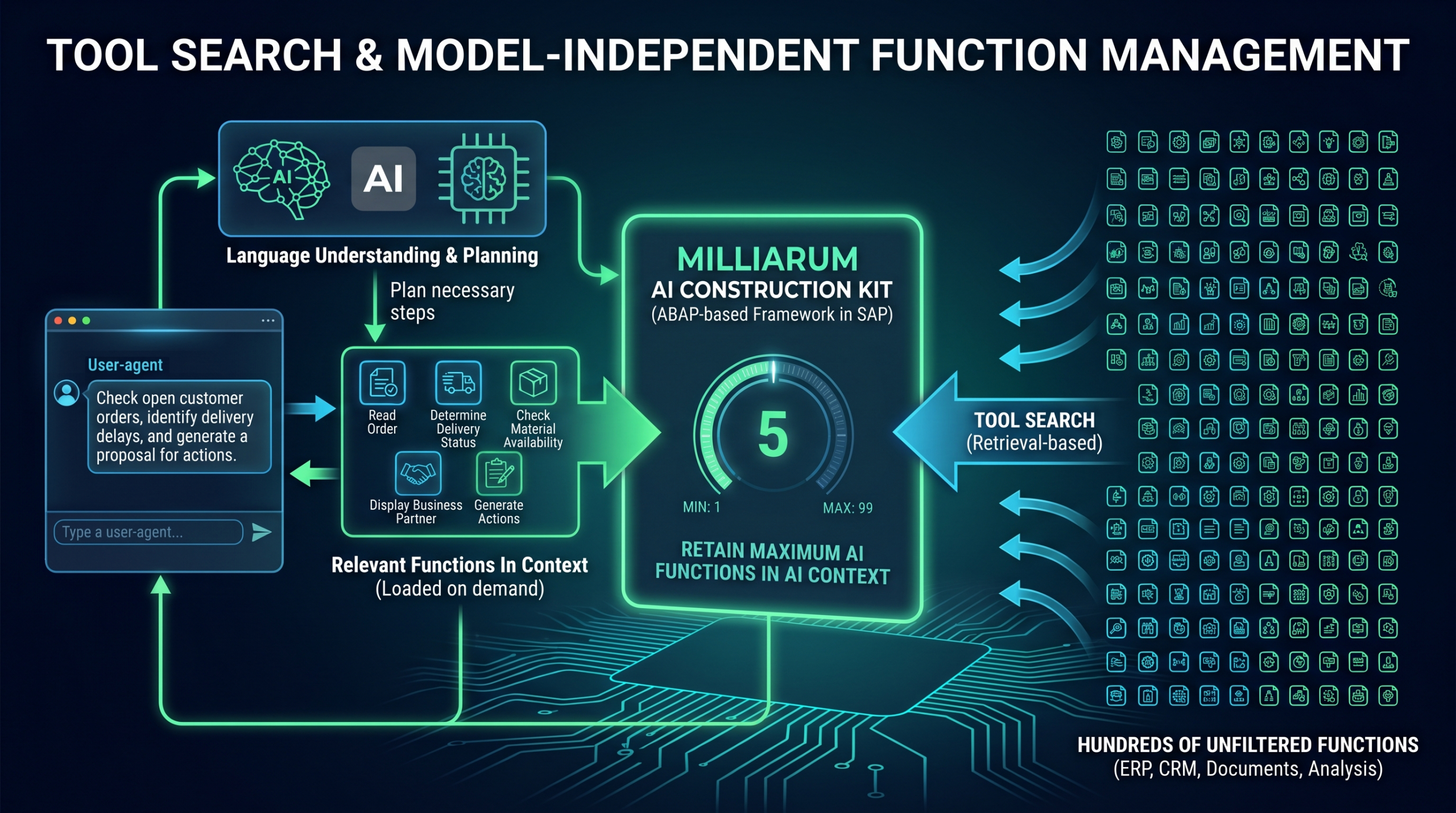
The more capable an AI agent becomes, the broader its range of functions typically becomes. While a specialized assistant might need only five or ten tools, enterprise agents quickly access hundreds of functions from ERP, CRM, document management, and analytics systems.
For each of these functions, the large language model requires a description: What does the function do? What parameters does it expect? What data does it return?
If all definitions are loaded in full into the model context for every query, token usage, costs, and latency all increase. At the same time, it becomes more difficult for the model to select the appropriate tool from a very large set.
The main challenge, therefore, is no longer:
How many features can an agent use?
Rather:
How does he get exactly the features he needs for his current task at the right time?
Tool Search: Providing Features Based on Need
Tool Search applies the retrieval principle—familiar from RAG systems—to executable functions.
Instead of providing the language model with the complete catalog of functions for every request, only a few core functions or high-level functional areas are initially made available. If the agent determines that it needs an additional capability, it searches for suitable tools. Only the relevant function definitions are then loaded into the context.
This keeps the context clearer, reduces token usage, and eliminates the need for the model to choose from hundreds of potentially irrelevant features.
OpenAI and Anthropic: Load Tools Only When Needed
OpenAI offers tool_search a mechanism through which functions, namespaces, or MCP servers can initially be set aside and loaded only when needed. Related functions can, for example, be grouped into areas such as order management, customer service, or materials management. The model then searches specifically within the appropriate functional area.
Anthropic takes a similar approach. Claude can also search through extensive tool catalogs and incorporate into the context only the functions relevant to a specific task. The search can be controlled either by Anthropic or by the customer application’s own search logic.
Both approaches primarily solve the discovery problem: The agent does not need to know all the tools at all times, but only needs to be able to find the tools it needs.
However, another question remains for companies: How can this principle be integrated into the existing application landscape, regardless of the specific language model used?
Milliarum: Model-Agnostic Function Management for SAP
The Milliarum AI Construction Kit operates at the integration and application levels. The ABAP-based framework enables the development of AI-powered applications directly within the SAP environment.
Through Customizing, you can manage, among other things, model connections, system prompts, personas (agents), and the AI functions permitted for an application. SAP function modules, ABAP classes, methods, and other data sources can be made available as functions for function calling.
This integration is not limited to a single model provider. The AI Construction Kit can be connected to APIs from OpenAI and Anthropic, among others. This ensures that the functionality and integration logic on the SAP side remain intact, even when different language models are used for different applications.
Maximum Number of Functions in an AI Context
For agents with a wide range of functions, Milliarum provides a central customization setting:
„Maximum AI capabilities that are retained in the AI context“
This setting determines how many function definitions are maintained simultaneously in the context of the language model. The configurable range of values is between 1 and 99 functions.
This means that a LLM-model-agnostic option to load the required functions into the context as needed and to limit the number of tools available at any one time.
Control is therefore not exclusively dependent on a proprietary tool-search function provided by a specific model vendor. It takes place within the integration layer of the AI Construction Kit and can be used regardless of whether the application works with OpenAI, Anthropic, or another supported model.
For a specialized agent, for example, a low upper limit may be appropriate. An assistant tasked with reviewing customer orders may only need functions to read the order, determine the delivery status, check material availability, and display the business partner.
In contrast, a cross-functional agent that also processes orders, projects, controlling data, and service transactions may require a larger number of functions that are available simultaneously.
The appropriate setting depends, among other things, on the use case, the model being used, the available context window, and the complexity of the function descriptions.
Interaction Between the Language Model and the SAP Functional Layer
In a potential target architecture, OpenAI or Anthropic would handle language understanding and task planning. The Milliarum AI Construction Kit manages the SAP-specific functions and controls which of them are available in the AI context.
A typical process might look like this:
For example, a user might phrase the task as follows:
„Review the open customer orders, identify potential delivery delays, and propose a course of action.“
The language model recognizes that this requires information from the areas of sales orders, deliveries, and material availability.
The AI Construction Kit provides the relevant SAP functions. The configured upper limit determines how many function definitions are retained simultaneously in the AI context.
The model then generates the necessary function calls. The AI Construction Kit maps these calls to the authorized SAP functions, ABAP methods, or data sources and returns the results to the language model.
The agent can evaluate the results, request additional functions as needed, and finally formulate a technical recommendation for action.
Tool Search alone is not enough
Dynamic loading of functions reduces the context size and improves tool selection. However, for productive use in enterprises, additional issues must be addressed:
What functions is an agent allowed to use? What user permissions apply? Is a function allowed to only read data, or can it also modify it? Does a write operation require approval? How are calls, parameters, and results logged?
In the SAP environment in particular, the risks vary significantly. Interpreting a delivery date must be evaluated differently than modifying a sales order or posting a document.
A central functional layer should therefore not only control the technical discoverability of tools, but also their approval, execution, and traceability.
Conclusion
OpenAI and Anthropic address large tool catalogs using Tool Search and on-demand loading of function definitions. This means the agent does not have to keep all available tools in context for every query.
The Milliarum AI Construction Kit extends this principle to include model-independent control within the SAP environment. With the Customizing setting „Maximum AI capabilities that are retained in the AI context“ The number of functions available at the same time can be flexibly adjusted between 1 and 99 be specified.
This ensures that function management can be configured centrally, regardless of the LLM used. OpenAI, Anthropic, or other models can be used for language understanding and planning, while SAP integration and control over the scope of functionality remain within the enterprise application.
The key question going forward, therefore, is not:
„How many features does our agent have?“
Rather:
„How do we ensure that he has only the right functions in context at the right time?“