
AI Applications in SAP On-Premise Using the Milliarum AI Construction Kit

With the Milliarum AI Construction Kit, you can use generative AI directly within your SAP system: access ERP data via voice commands, have AI agents execute SAP functions, and continue to apply your SAP system’s authorizations. The kit runs on S/4HANA, in the SAP Private Cloud, and on ECC systems, and can be operated using local or cloud-based AI models.

1.500+

Predefined AI functions

35+

Personas (Agents)

14

Supported SAP Modules

90–99 %

Fewer input tokens for large data sets

From chatbots to your own AI application

You can start with a ready-made chatbot app or use the Construction Kit to develop your own AI applications in SAP. Both approaches use the same infrastructure.
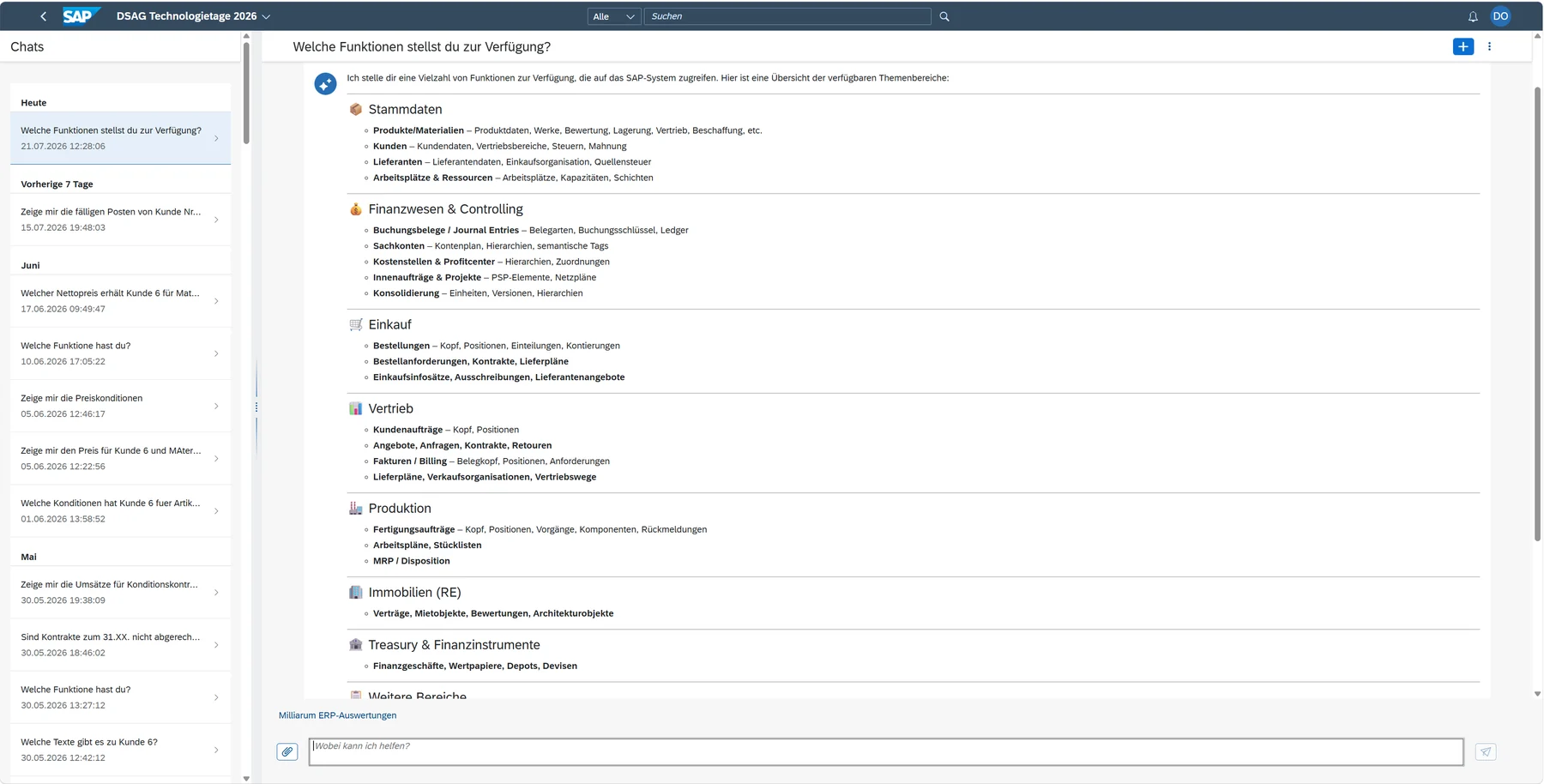
„General Chatbot“ App (No-Code)

Language-Based Interaction with SAP and Large Language Models (LLMs).

  • Chat and SAP UI5 Interface in a Single Application
  • Automated user support for using SAP functions
  • AI model integration—locally, in the cloud, or via SAP AI Core (open source or proprietary)
  • Support for the latest model families, such as Anthropic Claude 5 and 5.5 (Sonnet, Opus, Fable) and OpenAI GPT 5.6 and GPT 6
  • A Customizing environment that allows you to integrate any SAP tables, F4 search help, and CDS views as „data sources“ without any programming
  • Personas define agents with roles, prompts, and the appropriate model
  • Runs on S/4HANA (and SAP Private Cloud) as well as SAP ERP EHP7/8

Milliarum AI Construction Kit (Pro-Code)

Everything from the General Chatbot, plus tools for more advanced AI needs.

  • Development environment in SAP ABAP for creating chatbots with SAPUI5
  • Access to AI functions via your existing SAP infrastructure: Authorizations and roles, BAPIs, function modules, search aids, data elements, set/get parameters
  • Custom connectors for integrating LLMs
  • MCP Server and MCP Client for external access via the Model Context Protocol
  • OData service, e.g., for integration with SAP Joule
  • Over 1,500 predefined AI functions for analyzing ERP data (starting with S/4HANA 2023 FPS02 and in the SAP Private Cloud)
Milliarum chatbot interface featuring chat and SAP UI5 elements in a single application

The chatbot combines chat and the SAP UI5 interface in a single application.

Analyzing ERP Data in Natural Language

The kit includes over 35 predefined personas, organized by SAP module. They analyze complex ERP data based on CDS views while adhering to SAP authorizations. A query such as „Show me data for PSP element 90001.1“ is all it takes: The system selects the appropriate function from over 1,500 AI functions and executes it. It can switch between modules—for example, from PS to Real Estate—and displays alternatives if a function is unavailable.

Personas can be equipped with any number of functions. A built-in tool_search function manages these functions independently of the model. Analyses using built-in graphical functions are also possible.

Supported SAP Modules

CS

CO

FI

EHS

LE

MM

PLM

PSM

PP

Press Release

QS

P.S.

RE-FX

SD

Contents: Customizing data, master data, and transaction objects such as orders, purchase orders, sales orders, and documents.

You can find documentation and blogs in the Milliarum product documentation under „AI Construction Kit.“.
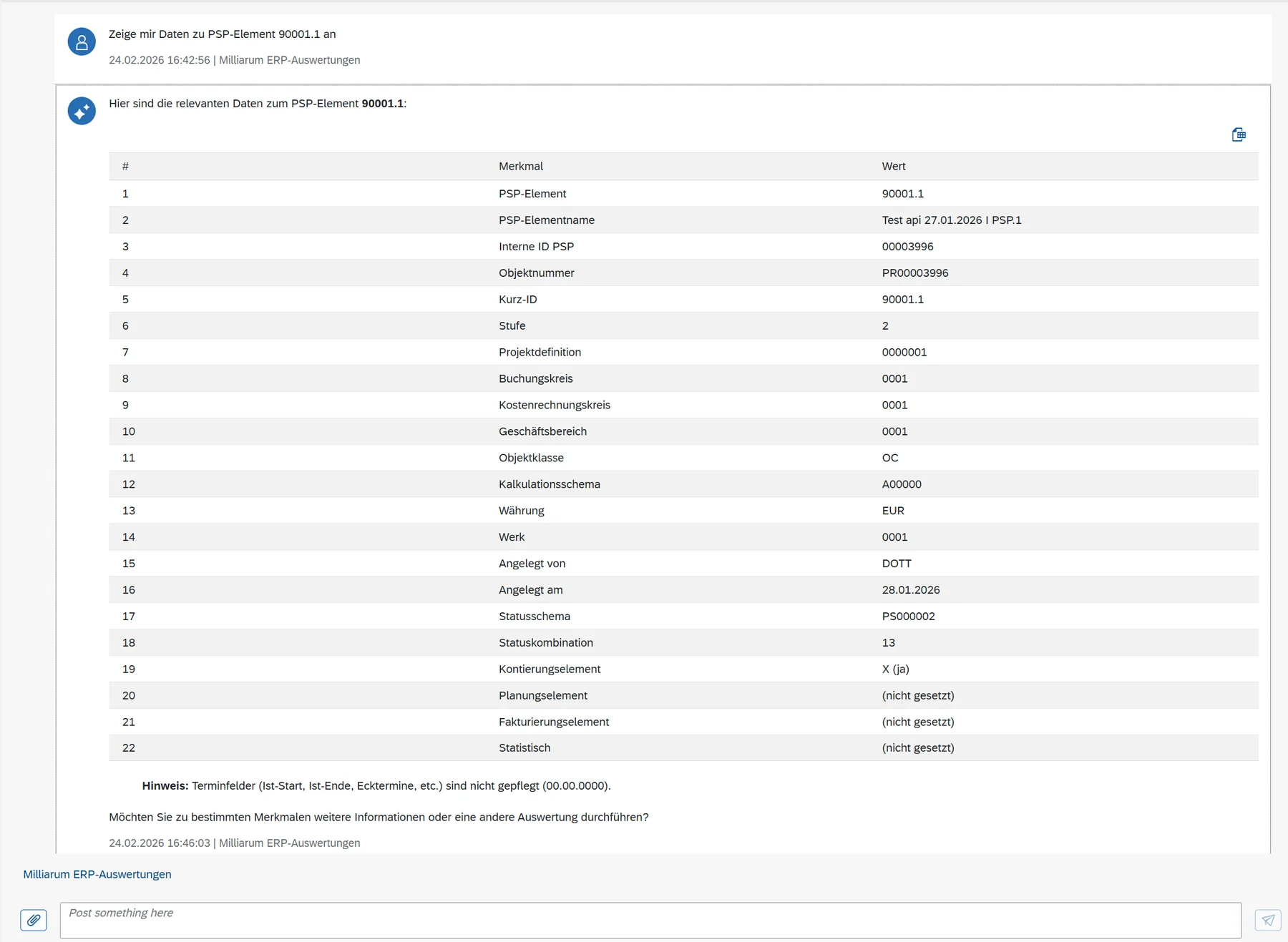
Chat response displaying the master data for PSP element 90001.1 in tabular form

Prompt: „Show me data for PSP element 90001.1.“ The system selects the appropriate AI function on its own.
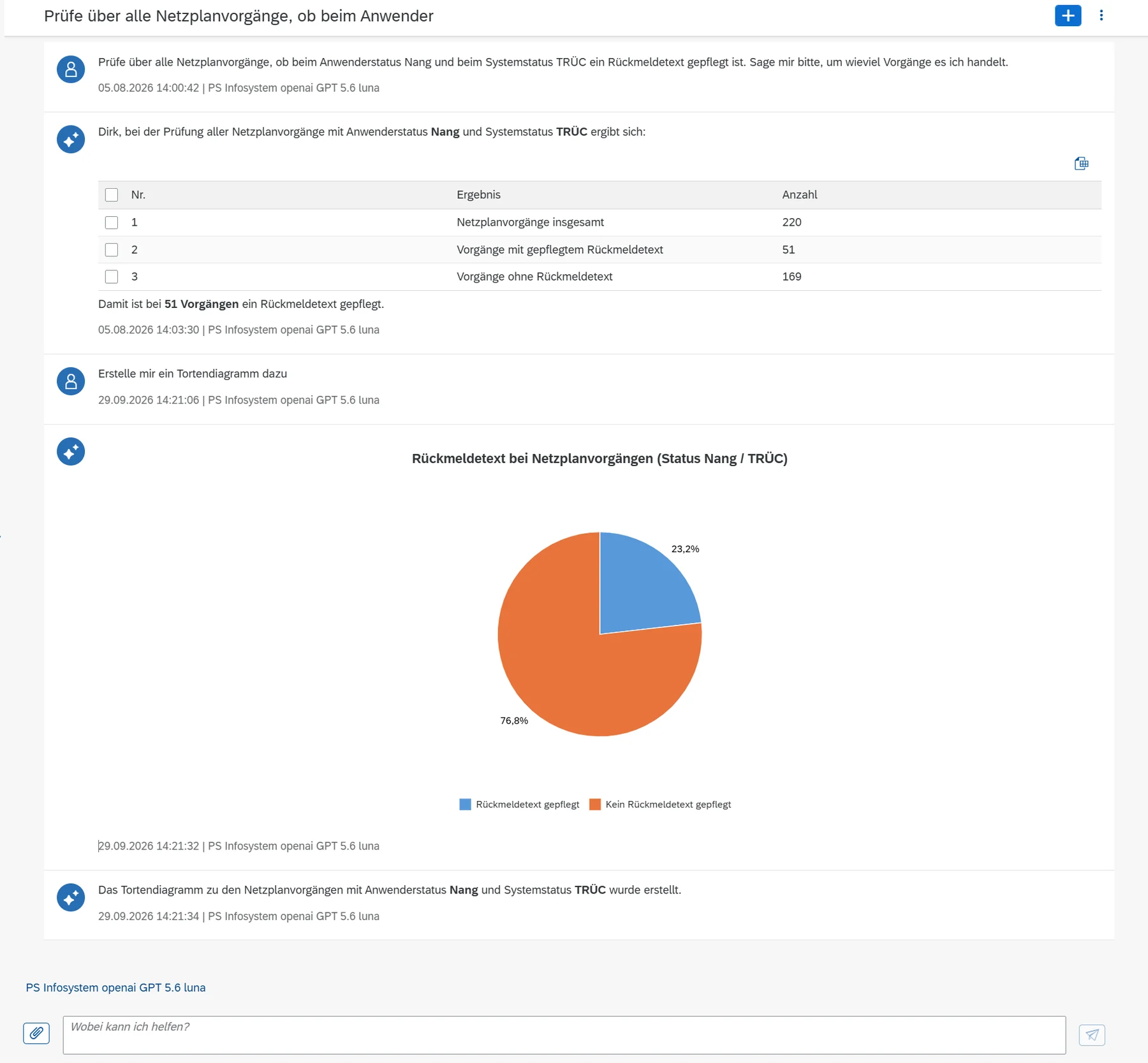
Chat response with a pie chart for evaluating network schedule activities

Analysis using built-in graphical functions, in this case for network activities and confirmation texts.

Large amounts of data without context overflow

The Challenge

  • AI models with a limited context window cannot process large amounts of data.
  • With large context windows, costs rise sharply, especially when outputting data.

The Milliarum Approach

  • With „Programmatic Tool Calling,“ data is processed by the model provider (Anthropic/OpenAI) or within the SAP system* and is not passed to the model.
  • Costs remain within budget because the input tokens decrease by 90 to 99 %.

* Processing in the SAP system will be available starting in December 2026.
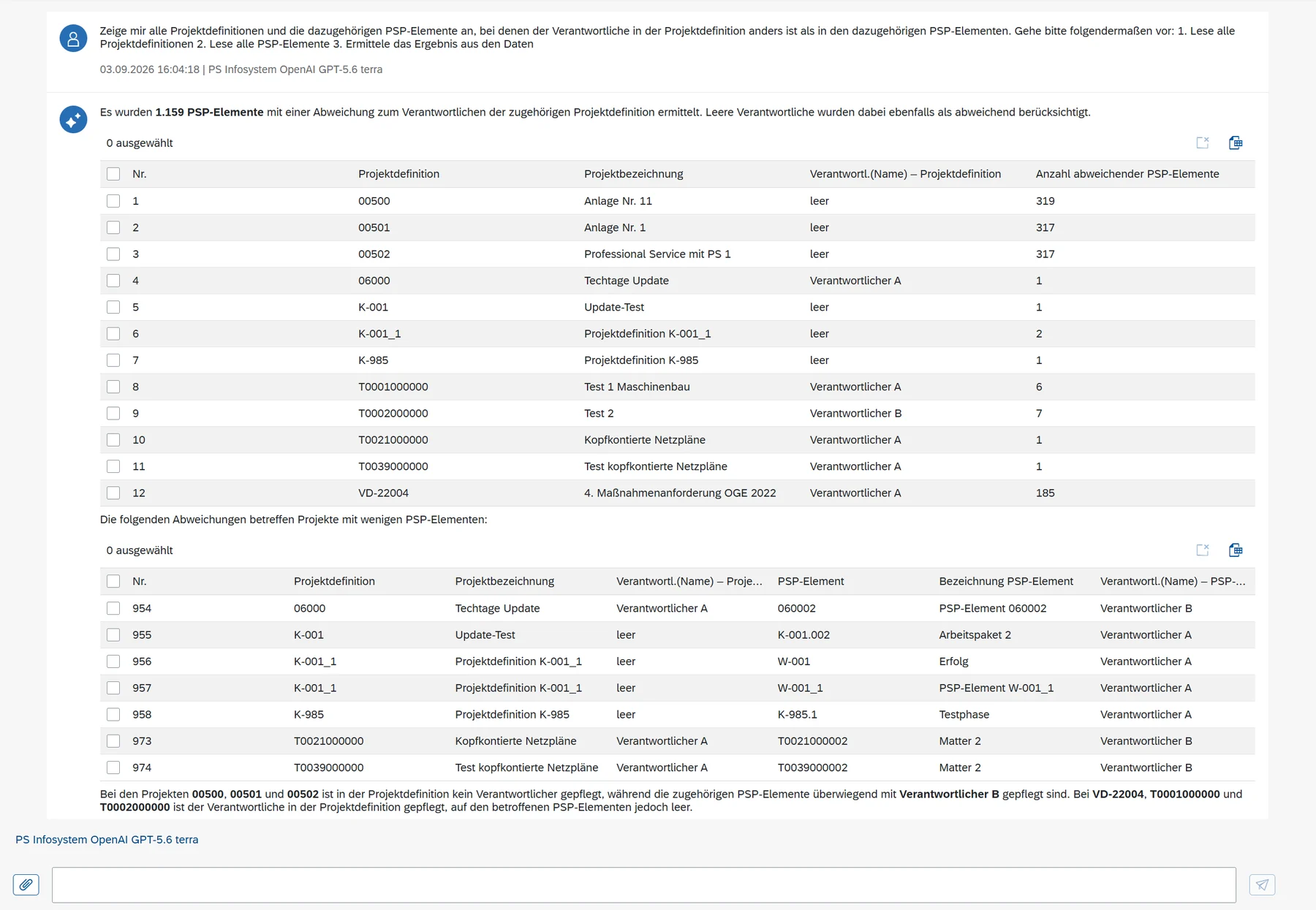
Chat analysis across all project definitions and PSP elements, with results tables

Example: Reconciliation of all project definitions and WBS elements. The result: 1,159 WBS elements with a different person in charge.

Three operating models, one set of features

Personas, AI functions, and access to ERP data always run within the SAP system. You choose where the AI model is deployed.

Local in SAP On-Premise

Without cloud access, on S/4HANA or ECC.

  • SAP data and AI inference remain within the company's own data center.
  • Inference server via vLLM (open source) or another OpenAI-compatible server with tool calling, such as SGLang, Triton, or TGI.
  • Recommended smallest open-source models: Gemma 31B or Qwen 3.8 27B.
  • An OpenAI-compatible connector for vLLM is included.
  • Hardware: Server with an NVIDIA graphics card and at least 96 GB of VRAM, such as the RTX 6000 PRO.

Note: Compared to OpenAI or Anthropic connectors, there is no PDF support (only image files), no built-in RAG, and no code-generation tool. These features can be added on the server side, e.g., PDF support via Kreuzberg (Xberg) or docling.
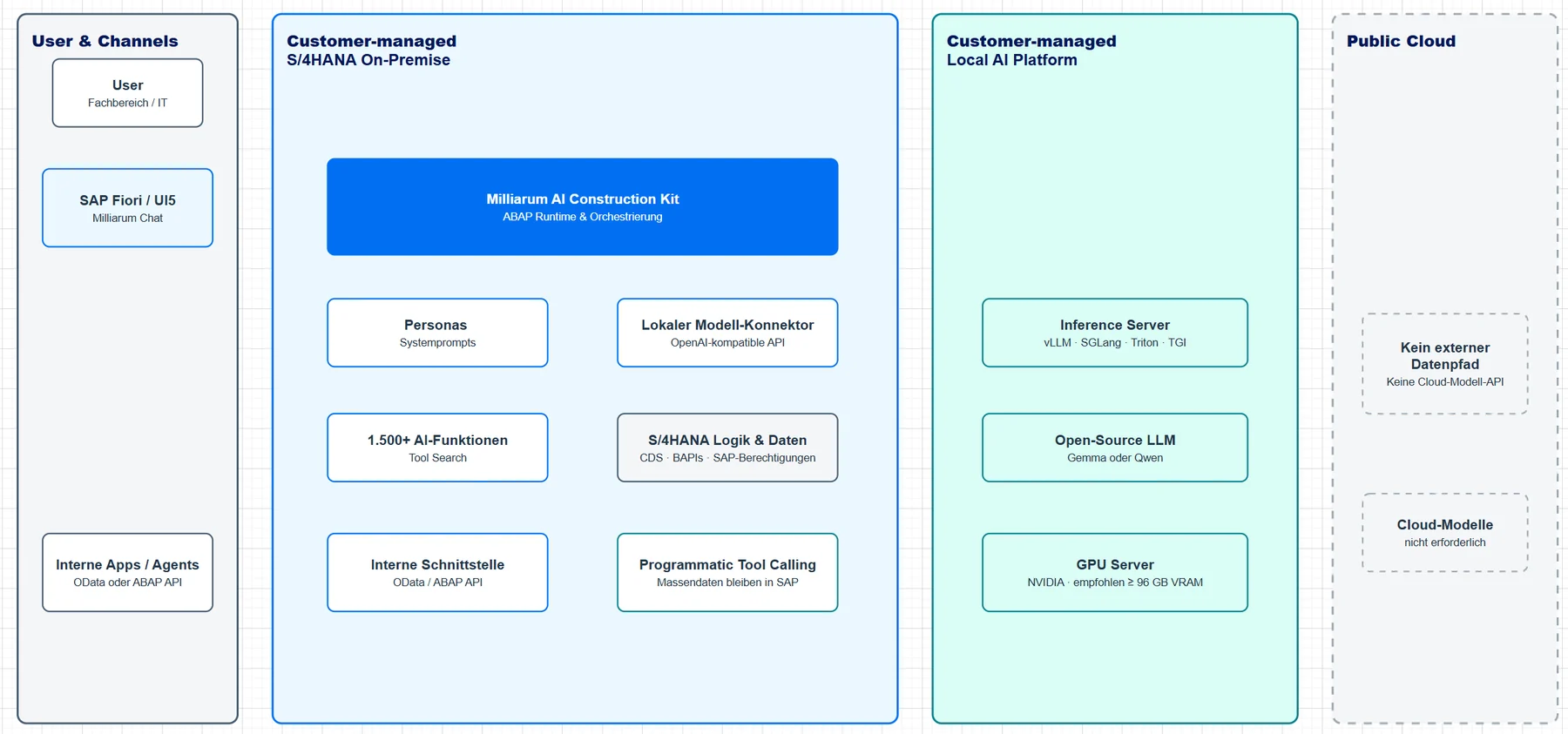
Architecture Diagram: Milliarum AI Construction Kit in a Pure On-Premises Environment

Architecture in a purely on-premises environment

Hybrid: On-Premises and Cloud Models

SAP-integrated execution on-site, high-performance models via API.

  • Models such as OpenAI are integrated via API, eliminating the need for a dedicated inference server and local GPU infrastructure.
  • Connectors and model-independent personas support various providers. A model change does not require any modification to the SAP logic.
  • Depending on the provider, PDF processing, RAG, and code tools are available without the need for local server extensions.

Note: With the hybrid approach, model queries and responses are transmitted to the selected cloud provider. You should define data classification, contractual terms, region, logging, and retention before going live.
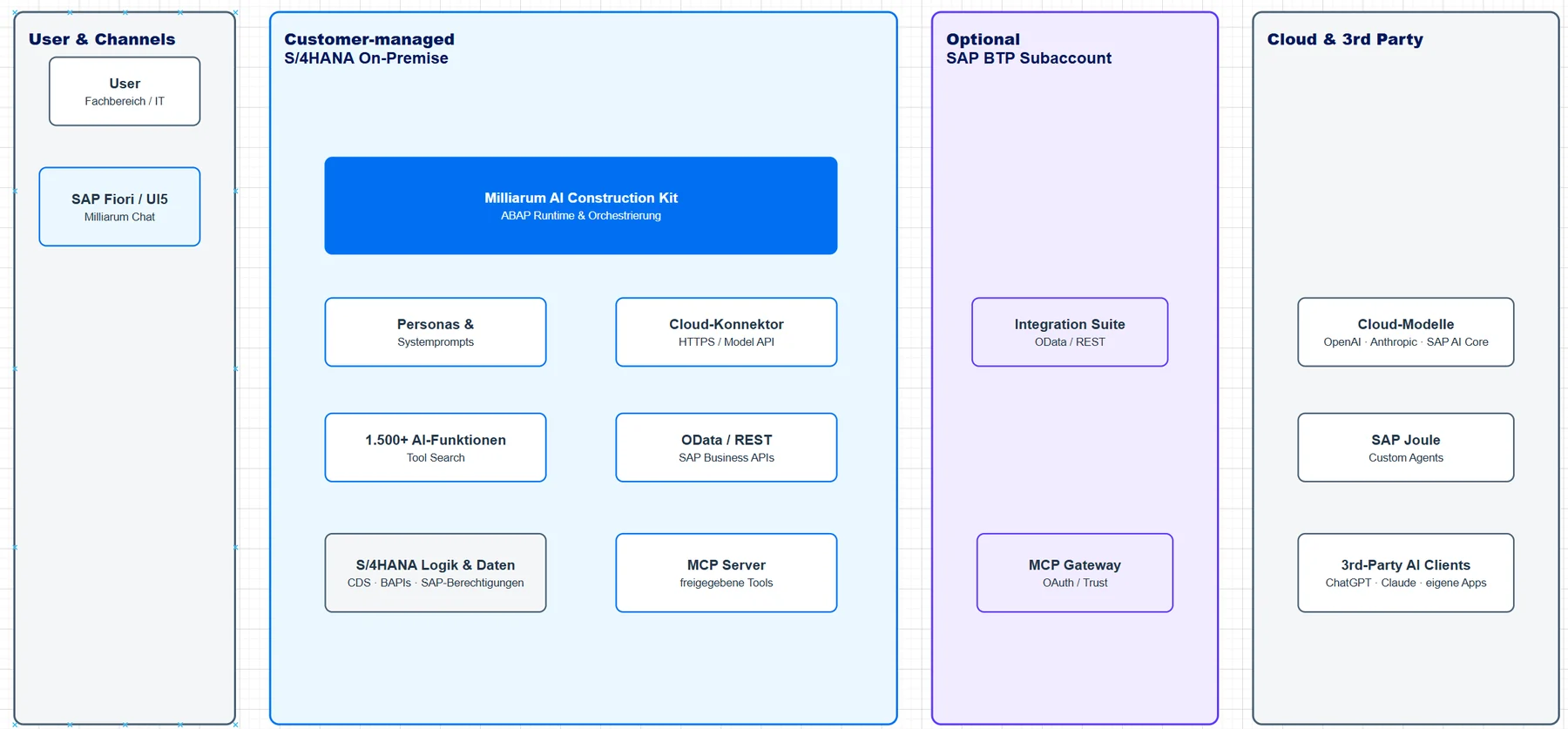
Architecture Diagram: Milliarum AI Construction Kit with SAP On-Premise and Cloud Models

Architecture of the Hybrid Approach

S/4HANA Private Cloud

The existing SAP Basis infrastructure speeds up the path to a production-ready AI application.
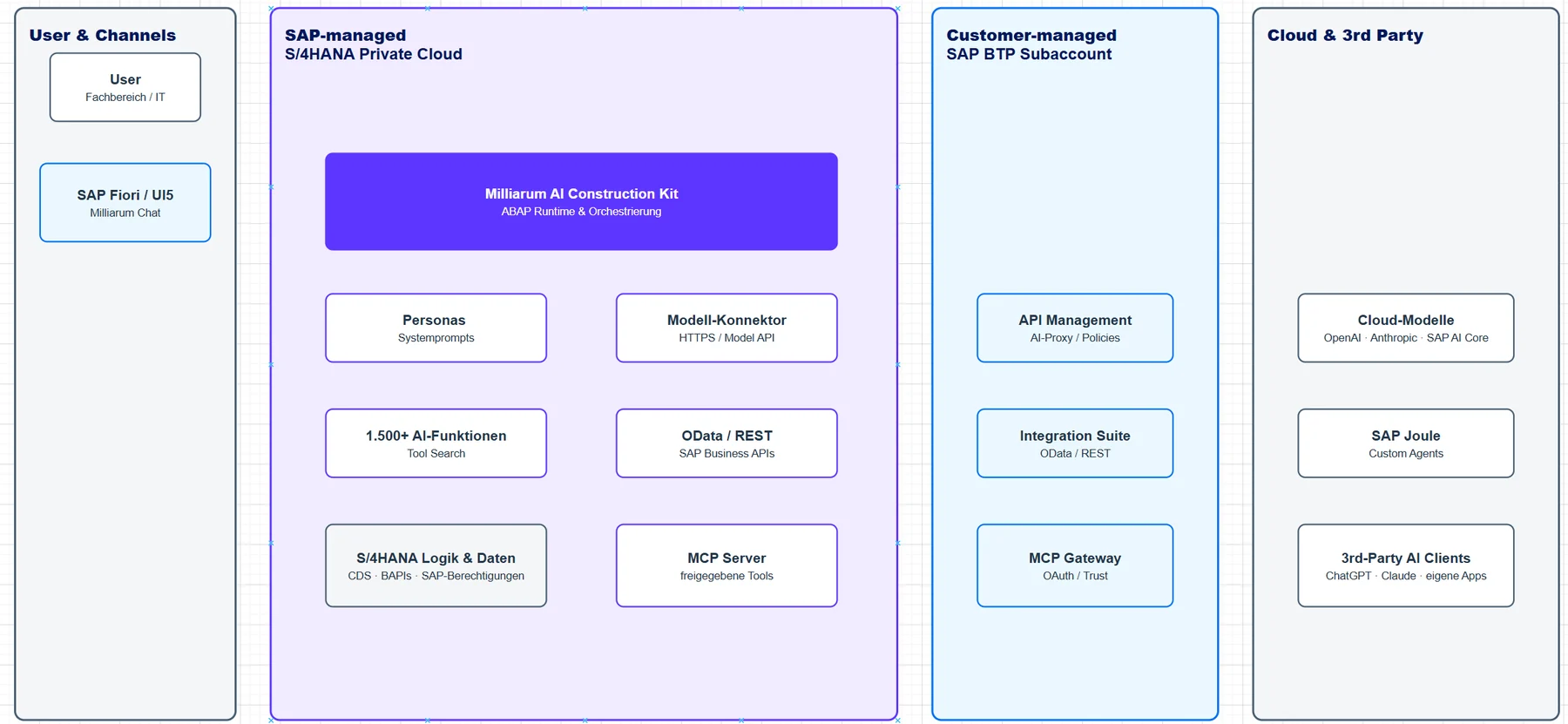
  • The kit is available starting with S/4HANA 2023 FPS02 and uses the existing ABAP and SAPUI5 infrastructure.
  • Connectors support cloud-based and on-premises models from any provider.
  • Personas and agents are assigned to the optimal model through Customizing, based on quality, speed, and cost.
  • OData and/or A2A connect personas to SAP Joule, while MCP provides SAP functions for additional AI applications.
Architecture Diagram: Milliarum AI Construction Kit in the S/4HANA Private Cloud

Architecture in the S/4HANA Private Cloud

In all scenarios, the AI functions access data in accordance with existing SAP roles and authorizations. The ABAP and SAPUI5 environments directly integrate BAPIs, function modules, search aids, and CDS views.

MCP Server with SAP BTP

ABAP-based AI functions can be used in external AI applications—securely and with the permissions of your SAP system.

  • AI personas and SAP functionality in applications such as Claude, ChatGPT, or Mistral (chats and agents) or in in-house applications
  • Secure Access to Internal Data via OAuth and Principal Propagation Using SAP BTP
  • Securing Destinations Using Attributes, Scopes, Roles, and Role Collections in SAP BTP
  • Backend in ABAP with an OData interface, MCP server in SAP BTP (Python)

Example: A chat with SAP PPM portfolio data in Claude via enabled MCP servers. In Teams and Enterprise plans, you configure the connectors centrally and specify the allowed tools.
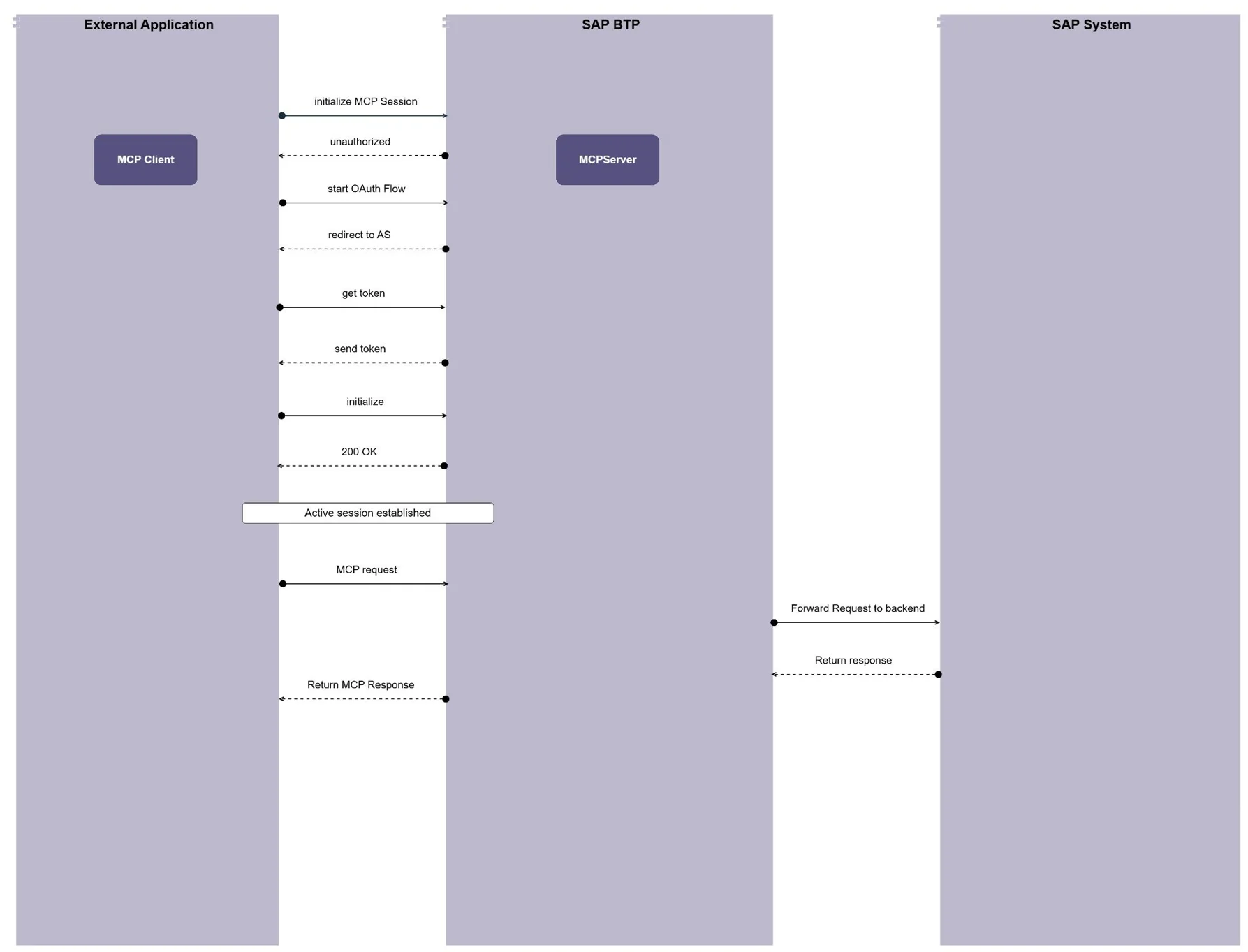
Overview of MCP Integration: External Application, SAP BTP, and SAP System

MCP Overview: External Application, MCP Server in SAP BTP, and SAP Backend.
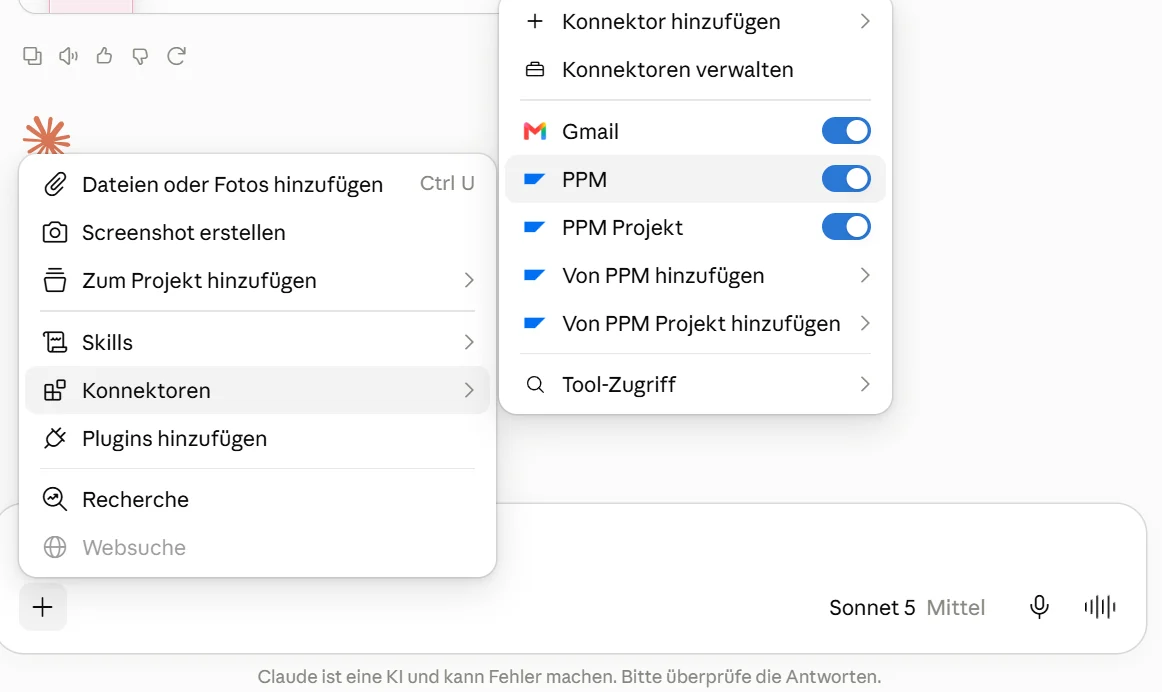
Claude Chat with a selection of enabled SAP PPM connectors

The SAP PPM MCP servers are activated in Claude via connectors.
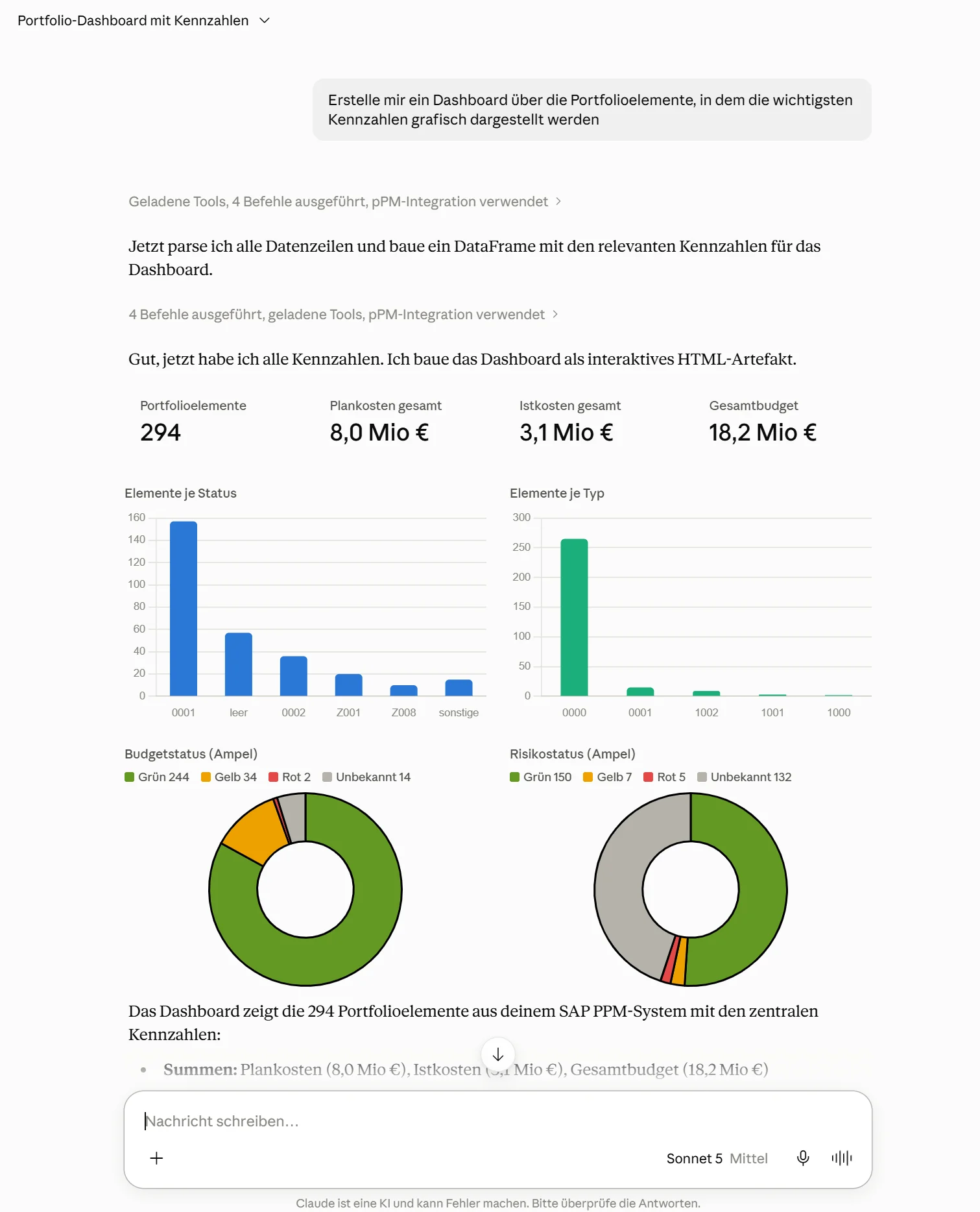
Dashboard created by Claude with charts showing portfolio data from SAP PPM

The result of a query via the MCP server, programmed live as a dashboard using Claude Code.

Integration with SAP Joule

Joule can be connected to SAP on-premise systems via SAP Build Process Automation and „Actions.“.
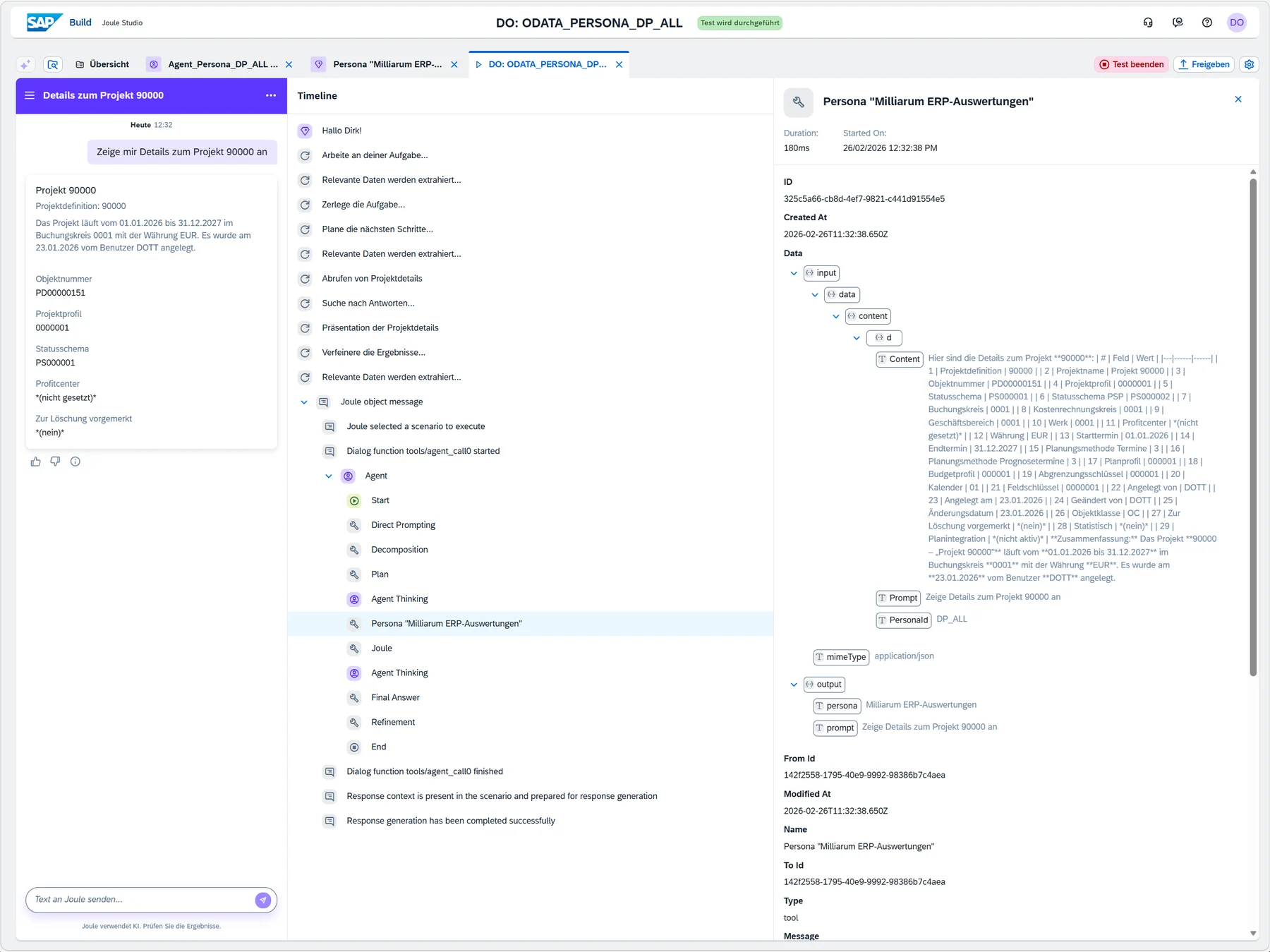
  • Milliarum provides a central OData service that links personas to actions.
  • A Joule skill selects the Persona and executes it via the OData service.
  • In Joule Agent, you define system prompts, add the skill as a tool, and select a model provider and model.
  • Support for the A2A (Agent2Agent) protocol for Joule integration is scheduled for Q4 2026.
Testing the Joule Agent with a Persona call via the Milliarum OData service

Test of the Joule Agent, which retrieves a Milliarum persona via the OData service.

Examples of Use Cases

General

  • Chat with the application documentation (Markdown) and navigate to the SAP application

Product Data Management (PDM)

  • Chat with internally shared documents from SAP DMS

Sales (SD)

  • Retrieving current data on customer orders, inquiries, and quotes, as well as pricing information, using natural language—for example, for the call center
  • Consistency check of customer master data, such as address information

PPM: Portfolio Elements

  • Simplified Submission of Project Ideas for Occasional Users
  • Inclusion of portfolio items consisting of documents and images

PPM: Project and Resource Management

  • Resource management reports by organizational unit, with easier SAP access for resource managers
  • Creating PPM Project Structures from Excel Files

Project System (PS)

  • Analysis of Project Structures and Identification of Anomalies
  • Analysis of Network Activity Confirmations for R&D Controlling

You can find more examples in the Milliarum product documentation under „AI Construction Kit“ in the „Blogs“ section.

Calculate your license costs and request a individual offer on

    Calculate license costs


    One-time license costs in €:

    Maintenance and support (annual) in €:

    One-time license costs in €:
    On request
    Maintenance and support (annual) in €:
    On request

    Please describe your individual request and we will get back to you.

    Contact details


    SAP information

    Is there anything else you would like to tell us?

    * Mandatory fields

    Are you interested in the Milliarum UI5 Construction Kit?

    Your contact Dirk Ott will be happy to advise you.